Let it
flow.
Keeps your MacBook's battery between the limits you choose.
Automatically, even while it's plugged in.
One-time purchaseNo account, no cookies7-day refund
THE APP
Your battery, at a glance.
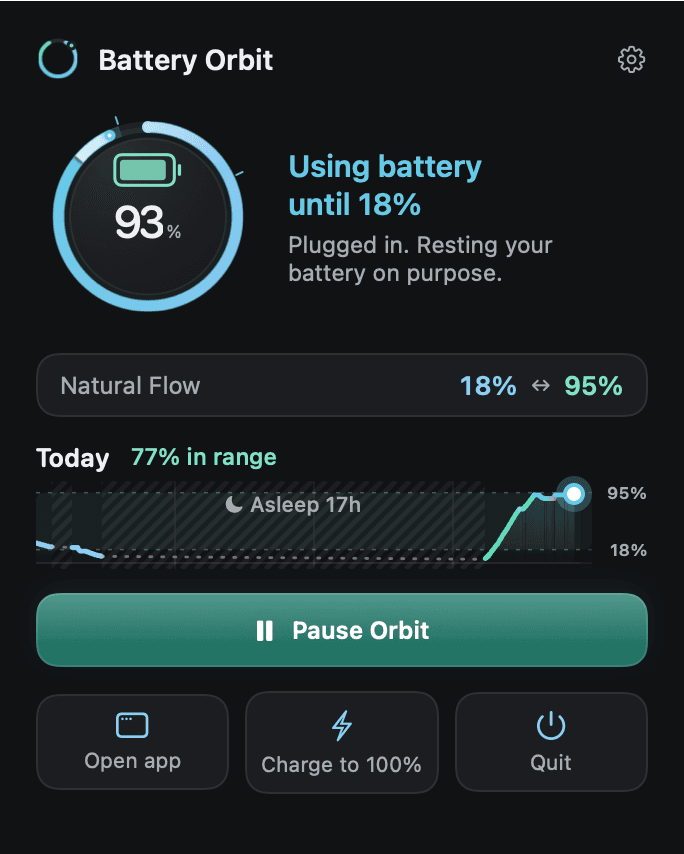
Where your battery is, what Battery Orbit is doing now and what comes next, and how today went. Here it is plugged in and running on battery on purpose, so the light in the ring flows backwards.
THE RING
The ring shows what your battery is doing.
Light runs in while it charges, out while it runs on battery, and breathes while it holds. The same ring sits in your menu bar.
Charges to 90%, runs on battery to 20%, repeats. The cable stays in.
MODES
Your battery, kept between 20% and 90%. Cable stays in.
That is Custom Orbit. Natural Flow varies the limits a little each time; Desk Hold keeps one level. Try the controls.
Keep the cable. Choose your orbit.
Battery Orbit charges to your upper limit, then runs on battery down to your lower limit, and repeats. Your cable can stay right where it is.
INSIGHTS
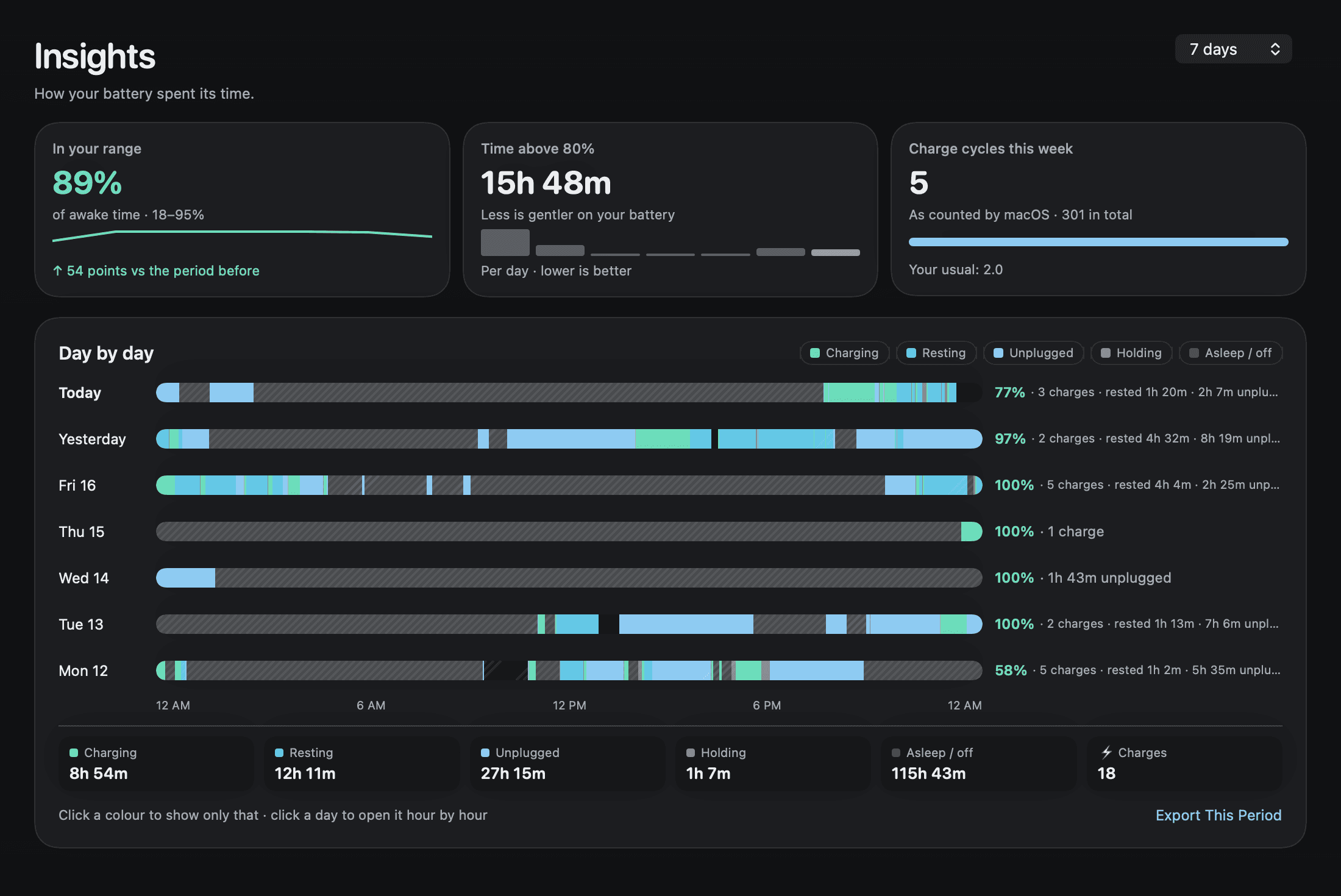
See how your battery spent its week.
How much of the time it stayed in your range, how long it sat above 80%, the charge cycles macOS counted, and every day hour by hour. Pick a colour to see only that, as in the app.
If you unplug, sleep or quit
Unplug
Your Mac simply runs on battery. Plug back in and your orbit carries on by itself.
Sleep
Close the lid or restart. Battery Orbit carries on by itself afterwards.
Quit
Quitting closes the app, and your orbit keeps running in the background. Press Pause first if you want normal charging.
Battery Orbit runs on your Mac, with no account. Your battery history never leaves it.
PRICING
Buy once, use it on your Mac for good.
A one-time purchase with a lifetime licence.
One key per Mac, or one key for 3, 5 or 10 Macs.
No subscription, no account.
Launch prices · first 30 orders
$7.99then $14.99
One licence key for one Mac. After the first 30 orders, 1 Mac is $14.99.
Prices in US dollars. Local taxes may be added at checkout.
- Custom Orbit, Natural Flow and Desk Hold
- Charge to 100% once, whenever you need it
- Insights and a plain day-by-day activity log
- Menu bar ring, light and dark
One-time purchaseNo account, no cookies7-day refund
Your licence key arrives by email right after checkout. Enter it on the Download page to get the installer, then paste it into the app. No account needed.
REQUIREMENTS
- A MacBook with Apple silicon (M1 or later)
- macOS 14.4 Sonoma or later
- Your Mac’s administrator password, once, to install the charging helper
Questions
Visit SupportWhat do the three modes do?
Custom Orbit charges to your upper limit, then runs on battery down to your lower limit, with the charger still connected. Natural Flow is a deep orbit whose limits change a little each time, about 18–22% at the bottom and 90–95% at the top. Desk Hold stays near one level while you work on the charger.
Do I need to unplug the charger?
No. Battery Orbit switches between charger and battery for you while the cable stays connected. If you do unplug, your Mac simply runs on battery, and your orbit continues by itself when you plug back in.
How is this different from macOS’s own battery settings?
macOS can stop charging at a level, and Optimized Battery Charging can wait before finishing to 100%. Either way, the battery stays near the top while you’re plugged in. Battery Orbit also lets your Mac run on its battery down to a lower limit with the cable still connected, then charges again, and shows what it’s doing in your menu bar.
What if I need a full battery?
Choose “Charge to 100% once” before you head out. It charges to 100% once, then your usual mode takes over again.
What happens when I pause or quit?
Pause hands charging back to macOS straight away. Quitting only closes the app: your orbit keeps running in the background. For normal charging, press Pause before you quit.
Why does the installer ask for my password?
Changing how your Mac charges needs a small system helper, and macOS asks for your administrator password once to install it. The helper only manages charging.
Is it a subscription?
No. Battery Orbit is a one-time purchase with a lifetime licence. For the first 30 orders it is $7.99 for one Mac; after that $14.99.
Can I use it on more than one Mac?
One licence key works on one Mac. For more Macs, one key can cover 3, 5 or 10: 3 Macs $20.99 (then $39.99), 5 Macs $34.99 (then $66.99), 10 Macs $62.99 (then $118.99). Prices in US dollars. Local taxes may be added at checkout.
Is there a free trial?
No, but you can try it with no risk. If Battery Orbit isn’t right for your Mac, write to support within 7 days of buying for a full refund.
Which Macs does it support?
MacBooks with Apple silicon (M1 or later) running macOS 14.4 Sonoma or later. Intel Macs aren’t supported.